
Home page guide
What the three groups on the home page mean and how to pick a starting point.
Page screenshot
Numbered markers highlight areas described in the steps below (desktop layout).
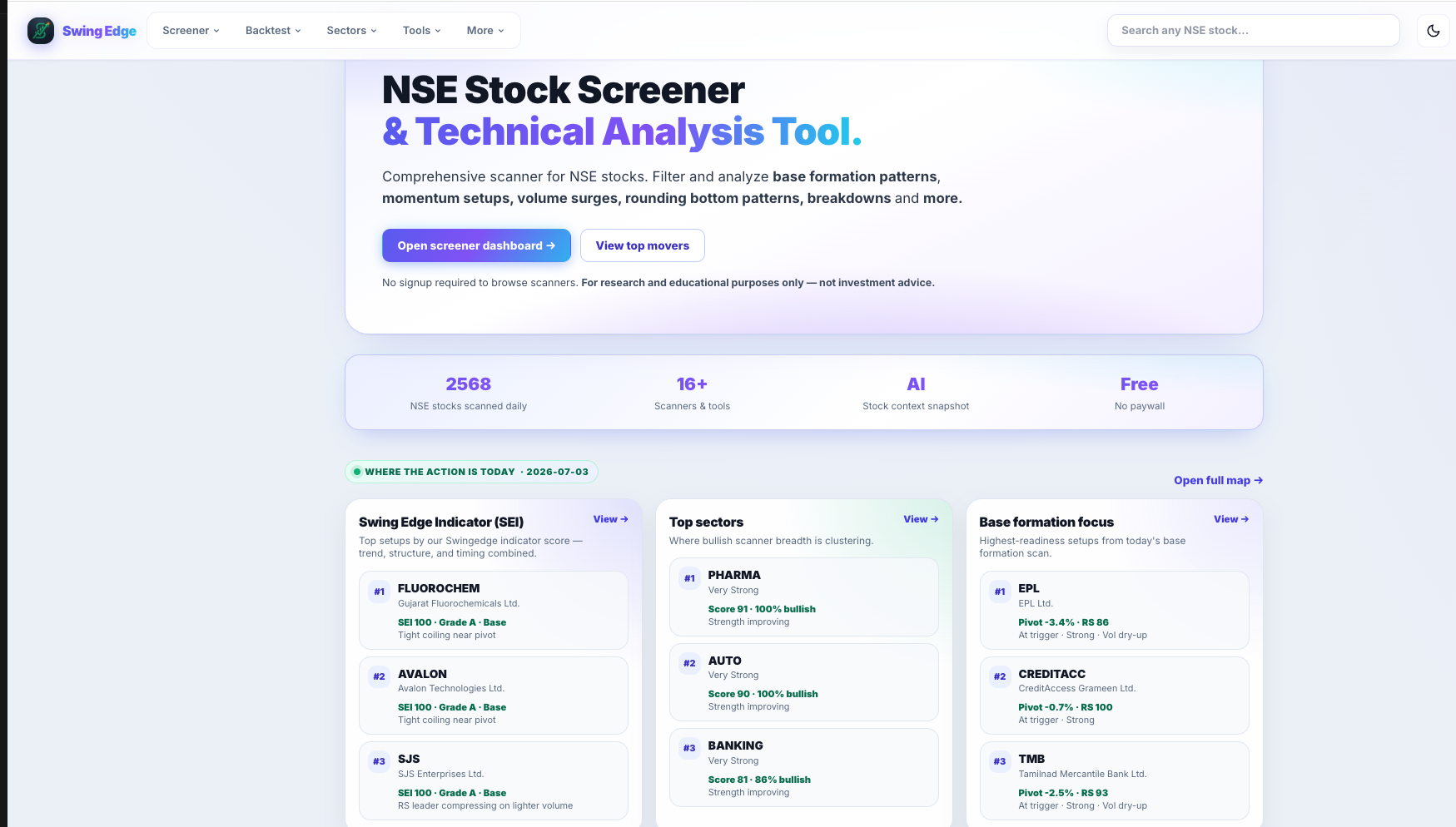
- Top navigation
- Open screener dashboard
- SEI top setups
- Top sectors
- Base Formation focus
Screenshot coming soon
Add desktop.png under static/tutorials/home-page/
Step-by-step
-
What the home page is
The landing page after sign-in (or the main entry from the logo). It groups every scanner and board by purpose so you can jump straight to a research lane without hunting the sidebar.
-
Pre-built scans
Full nightly rule sets: Base Formation, Momentum Continuation, Momentum Buildup, Early Momentum, Downside Risk, pattern scanners (Darvas, Structural, Rounding), Swing Edge Indicator, and Custom Scanner. Each card opens that scanner’s saved list from the latest run.
-
Today's focus screens
Smaller daily slices — Near Pivot, VCP Coiling, Pullback Entry, 52-week high lists, Stage 2 Uptrend, Volume Surge, and similar. Same underlying data, tighter filters for one idea per page.
-
Boards & lists
Market Map (where hits cluster), Scanner Movers (day-over-day changes), Scanner Results (historical outcomes), Community Watchlist, and ETF boards. These are overview and context pages, not replacement scanners.
-
Scan date
Most scanner cards show when the list last refreshed — usually after market close (~4:30 PM IST). If the date looks old, the nightly job may not have finished yet.
-
No fixed workflow
Open any group that matches your question. Typical path: scanner row → stock detail page → tool (sizing, compare, analyzer) — but any order works.
Detailed reference
Pre-built scan vs daily screen
Pre-built scans keep the full curated list for that strategy (often 40–80+ names). Daily screens are short lists for one condition (e.g. within 3% of pivot). Both use the same nightly data pass.
Signed in vs guest
Guests see a preview of scanner cards. Sign in free to unlock full lists, My Watchlist, My Terminal, saved custom presets, and trade plans.
Open in the app
FAQ
What does the Home page tutorial cover?
What the three groups on the home page mean and how to pick a starting point.
Is the Home page tutorial investment advice?
No. Swing Edge tutorials explain scan data and app features for your own research. They do not recommend buying, selling, or holding any security.
How do I get started with Home page on Swing Edge?
What the home page is: The landing page after sign-in (or the main entry from the logo). It groups every scanner and board by purpose so you can jump straight to a research lane without hunting the sidebar.